Book an Appointment
Call Murray  Computer Repair Service at 
801-679-2640
                   

(801) 679-2640

*


Murray Computer Repair Service has provided the best mobile computer repair in Murray, UT and the greater Salt Lake City Metro Area since 1999. The term "mobile computer repair" means we come to you to resolve all your computer problems.

We repair laptops, desktops, PCs and Apple computers. One of our highly qualified staff will come to you, often the same day, to take care of all your repair needs.

Why not use the #1 rated company for computer repair in Murray, UT?

Computer Repair 4.9 / 5 stars from 289 reviews
Why use a computer tech when you can have a Murray based Computer Engineer? Mon-Sun 8:00am - 8:00pm

Call us at (801) 679-2640

Text us at (801) 679-2640

Email us your questions

Book an Appointment

"Jason was courteous, knowledgeable and efficient in his work. He resolved problems with both of my laptops. The work was completed in a timely manner and charges were quite reasonable."
Murray Computer Repair Service 5 / 5 stars
"Matt did a great job, solved a number of my issues , would recommend him and the company."
Murray Computer Repair Service 5 / 5 stars
"Ben is great at what he does. He was able to find out my problem within minutes. Great service and highly recommended!!!!"
Murray Computer Repair Service 5 / 5 stars
"Taylor was most helpful. Thorough and knowledgeable, 5 stars all the way."
Murray Computer Repair Service 5 / 5 stars
"I had the greatest experience with the technician. My computer is running better than it ever has. I had to get a new hard drive and he was able to ensure all my files came over and I did not lose anything. I am 1000% satisfied. He was awesome. He was very knowledgeable and personable. I would give him 100 stars."
Murray Computer Repair Service 5 / 5 stars

Who is Murray Computer Repair Service?

Murray Computer Repair Service is owned by Matt Karls, an Electrical Engineer and a Computer Systems Engineer. We are a team of computer professionals focused on service and quality, all our work is guaranteed.

If you have any computer, technology or IT problem in Murray, UT we can fix it. We have been performing computer repair in Salt Lake City full time since 1999. Feel free to give us a call or text us at (801) 679-2640.

Murray  Computer Repair Service's Computer Engineer

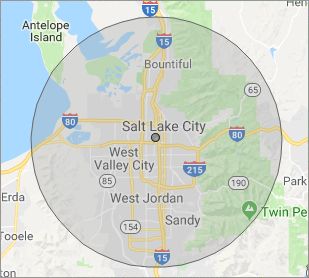
What is your Service Area for on-site Computer Repair?

Our primary on-site mobile service areas include the greater Salt Lake City metropolitan area and the Phoenix, Tucson, Las Vegas and San Diego metro areas.

We provide remote and mobile computer repair in Murray, Bluffdale, Bountiful, Centerville, Cottonwood Heights, Draper, Farmington, Herriman, Holladay, Kearns, Magna, Midvale, Millcreek, North Salt Lake, Riverton, Salt Lake City, Sandy, South Jordan, South Salt Lake, Taylorsville, West Jordan, West Valley City and Woods Cross.

Our on-site Computer Service Area

What should someone expect that hires you for Computer Service?

Our mission is to fully resolve your computer problems quickly and affordably. If you want a Computer Engineer that can fix all of your computer problems instead of a computer tech, a computer geek, a technician or a computer guy that can only fix some of your problems; call us at (801) 679-2640.  

What types of Computer Services do you perform?

We service businesses and business clients in their homes, including:
 
  • Diagnose / repair hardware or software problems
  • Spyware, malware, trojan and virus removal
  • Setup wireless and small business networks
  • Laptop repair, PC repair and Apple repair
  • Hard drive data recovery

Murray Computer Repair Service Contact Information

Murray Computer Repair Service
(801) 679-2640

Murray Computer Repair Service is a Karls Technology company

* *
*
*
*
  *
* *


*
*
* * * * * * * * * * * * * * *
4.9 / 5 stars from 289 reviews

"I had a major computer failure that I couldn't resolve. As it might have been a hardware conflict, I wanted a tech to check out the system at home with everything connected. Taylor came out actually ahead of schedule, ran the diagnostics and the issue was resolved. I couldn't be happier with the service and professionalism. Thank you."

Murray Computer Repair Service 5 / 5 stars

"Matt was excellent. He explained my problems in a way I could understand and fixed them all! I would highly recommend this computer company."

Murray Computer Repair Service 5 / 5 stars

"Excellent, all is working, thank you."

Murray Computer Repair Service 5 / 5 stars

"Ben came out to help us with our laptop after we had an issue with a virus and he was very helpful and informative on the matter. He was very respectful and kind in our home. Glad we put our trust in him, would recommend to friends and family!"

Murray Computer Repair Service 5 / 5 stars
Best Antivirus Software of 2026: The Ultimate Guide to Cybersecurity Brands

In 2026, the digital threat landscape has shifted. We are no longer just fighting simple viruses; we are defending against AI-generated phishing, sophisticated ransomware-as-a-service, and complex identity theft. Choosing the right antivirus brand is no longer optional—it is the foundation of your digital life. At Karls Technology, we’ve analyzed the top-performing security suites of the […] The post Best Antivirus Software of 2026: The Ultimate Guide to Cybersecurity Brands appeared first on Computer Repair Blog.

iOS 16 Updates

During its June 6 WWDC keynote, Apple detailed its major operating system updates for the year. iOS 16 has been in beta testing for months, and it has now been released by Apple (along with watchOS 9 and tvOS 16). Many of iOS 16’s functions have received a few entertaining enhancements. For instance, the Lock […] The post iOS 16 Updates appeared first on Computer Repair Blog.

Temporary Files on Windows OS

A temporary file is a file that is made to hold data while another file is being made or updated. The temporary file (also known as a temp file) is deleted after the program has been closed. Temporary files can be used for a wide variety of purposes, from storing and transferring data to handling […] The post Temporary Files on Windows OS appeared first on Computer Repair Blog.

Windows OS is Unresponsive – Fast Startup

Turning off this feature could be the quickest and easiest approach to solve this problem. The useful function known as “Fast Startup” maintains your Windows OS in the hibernation mode so that it does not need to be completely relaunched after it has been shut down. This results in a significantly quicker reboot. Even though […] The post Windows OS is Unresponsive – Fast Startup appeared first on Computer Repair Blog.

iPhone Switching to USB-C

Because the European Union (EU) will mandate USB-C for all devices sold within its member states by 2024, Apple will be compelled to make the switch for the next generation of iPhones. During this time, the European Union (EU) will require USB-C for all devices sold within its member states. Perhaps Apple will only upgrade […] The post iPhone Switching to USB-C appeared first on Computer Repair Blog.

Smart App Control on Windows

Microsoft’s newest Windows 11 update (22H2) came with a plethora of new features. One in particular is the Smart App Control, or SAC. What is SAC? According to Microsoft, the capacity of Smart App Control to terminate potentially dangerous or otherwise unreliable applications enables an effective defense against new and unanticipated threats. With the SAC, […] The post Smart App Control on Windows appeared first on Computer Repair Blog.

Don’t Install Unfamiliar Browser Extensions

You should be aware of how unsafe it is to install software on your personal computer that you are unfamiliar with and have no idea what it does. Including things like putting in browser extensions. Users assumed browser add-ons were safe because they were uninformed about the dangers they could offer. In short, be weary […] The post Don’t Install Unfamiliar Browser Extensions appeared first on Computer Repair Blog.

Permanently Delete Files

Erasing something from a computer does not completely eliminate the information, but sends it to the recycling bin. This creates a problem, should you need to sell your machine. You don’t want your sensitive information leaking to the wrong person. A simple shortcut can be used to avoid having files automatically sent to the trash […] The post Permanently Delete Files appeared first on Computer Repair Blog.

Protect Your Personal Information – Change Password

If your password has been compromised as a result of a security breach, you should change it promptly. Do not use the same password on multiple websites. Hackers and crooks are well-versed in all trade secrets. You can reduce the amount of damage done by using a different, strong password for each protected site you […] The post Protect Your Personal Information – Change Password appeared first on Computer Repair Blog.

What are Snap Layouts?

Microsoft users, read on! According to Microsoft, snap layouts are a new Windows 11 feature to help introduce users to the power of window snapping. Snap layouts are easily accessible by hovering the mouse over a window’s maximize button or pressing Win + Z. These snap layouts provide you a lot of leeway in terms […] The post What are Snap Layouts? appeared first on Computer Repair Blog.